📚 Table of Contents
- The Friday Night Deployment Nightmare
- What CI/CD Actually Solves (The Real Problem)
- Continuous Integration: Catching Problems Early
- Continuous Delivery vs Deployment: The Critical Difference
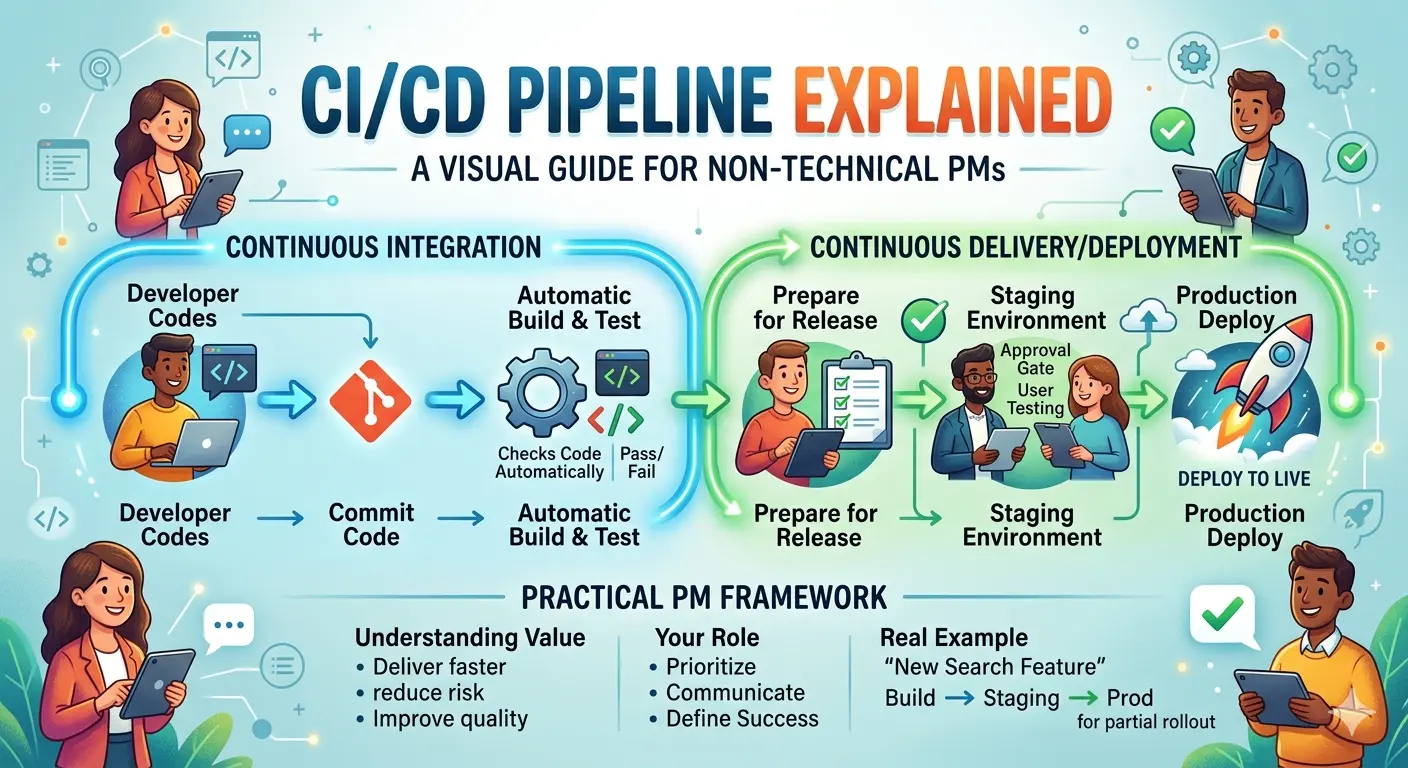
- Visual Walkthrough: A Code’s Journey Through CI/CD
- The Five Pipeline Stages Every PM Should Know
- CI/CD Tools Landscape: What PMs Need to Know
- How to Talk CI/CD with Your Engineering Team
- Metrics That Actually Matter for Product Success
- Common CI/CD Problems and How PMs Can Help
- Your CI/CD Action Plan
The Friday Night Deployment Nightmare
It’s 6 PM on a Friday. Your engineering team just deployed a “small fix” to production. The CTO is already heading home. Then your phone buzzes.
Customer support: “Users can’t log in. We’re getting 500 calls.”
Engineering lead: “We’re rolling back… wait, the rollback script is failing.”
You: sitting there wondering how a simple button change broke the entire login system.
By midnight, you’ve lost 6 hours of revenue. Your team is exhausted. And nobody trusts the next deployment.
This scenario happens constantly. And it’s completely preventable.
The difference between teams that deploy confidently and teams that panic isn’t skill. It’s process. Specifically, it’s having a proper CI/CD pipeline.
If you’ve ever nodded along in meetings while engineers discussed “pipelines” and “builds” without really understanding, this guide is for you. You don’t need to write pipeline code. But understanding CI/CD will transform how you plan releases, communicate with engineering, and prevent those midnight emergencies.
What CI/CD Actually Solves (The Real Problem)
Before diving into solutions, let’s understand the problem.
The Old Way: Big Bang Deployments
Before CI/CD, teams deployed like this:
- Developers work in isolation for weeks or months
- Everything gets merged together a few days before launch
- Integration problems surface (usually catastrophic ones)
- Last-minute panic fixes
- Deploy everything at once
- Hope nothing breaks
This approach has a name: Big Bang Deployment. And it’s exactly as risky as it sounds.
The statistics are brutal:
- 46% of deployments cause production incidents
- Average recovery time: 3+ hours
- Teams deploying this way ship 10x slower than teams with CI/CD
What CI/CD Does Differently
CI/CD inverts the risk. Instead of one massive deployment that might fail catastrophically, you have hundreds of tiny deployments where any single failure is small and recoverable.
Think of it like this:
Big Bang Deployment: Shipping a whole house at once. If anything’s wrong, the whole house is broken.
CI/CD: Building the house brick by brick, checking each brick as you go. If one brick is bad, you replace just that brick.
💡 The Naked Truth: CI/CD doesn’t eliminate problems. It makes problems smaller, earlier, and fixable. That’s the real value.
Continuous Integration: Catching Problems Early
Continuous Integration (CI) is exactly what it sounds like: integrating code continuously instead of all at once.
Here’s how it works in practice:
Without CI
Week 1-4: Developer A builds Feature X (isolated)
Week 1-4: Developer B builds Feature Y (isolated)
Week 5:   Merge everything together
Result:   47 conflicts, 3 major bugs, 2 weeks of fixes
With CI
Day 1: Developer A commits code → Tests run → Merge
Day 2: Developer B commits code → Tests run → Merge
Day 3: Conflict found → Fixed immediately
Day 4: Both features working together
Result: Problems caught daily, not monthly
The key principle: Every time code is merged, automated tests run. If something breaks, you know immediately—not weeks later.
What Actually Happens in CI
When a developer pushes code:
1. Code committed to repository
   ↓
2. CI server wakes up automatically
   ↓
3. Code is built (compiled/packaged)
   ↓
4. Automated tests run (thousands in seconds)
   ↓
5. Code quality checks (linting, security scans)
   ↓
6. Results reported back to developer
   ↓
   ✅ All passed → Code can merge
   ❌ Any failed → Developer fixes before merging
Time for all this: Usually 5-15 minutes.
Why this matters for you: When engineering says “we can’t merge yet, tests are running,” they’re not being difficult. They’re protecting your product from broken code.
Continuous Delivery vs Deployment: The Critical Difference
These terms sound similar but have one crucial difference that affects how you plan releases.
Continuous Delivery
Definition: Every code change that passes tests is automatically ready to deploy to production. But the actual deployment requires human approval.
What it means: You could deploy anytime. The code is always in a “shippable” state. But you choose when.
Typical workflow:
Code passes all tests → Staging environment → Human approval → Deploy button
Best for: Teams that want control over when features go live (regulated industries, coordinated launches, etc.)
Continuous Deployment
Definition: Every code change that passes tests automatically deploys to production. No human approval needed.
What it means: Code goes live the moment it’s ready. Developers commit, tests pass, it’s in production.
Typical workflow:
Code passes all tests → Automatic production deployment → Done
Best for: Mature teams with excellent automated testing and monitoring. Companies like Netflix, Google, and Amazon deploy this way.
Which Should Your Team Use?
| Factor | Choose Delivery | Choose Deployment |
|---|---|---|
| Testing maturity | Building tests | Comprehensive tests |
| Risk tolerance | Moderate | High confidence |
| Regulatory requirements | Compliance needed | Minimal oversight |
| Feature coordination | Planned launches | Continuous releases |
| Team experience | Growing team | Experienced team |
⚠️ Warning: Don’t jump to continuous deployment before your team is ready. I’ve seen teams try this without proper testing and monitoring. It creates chaos, not speed. Start with continuous delivery. Graduate to continuous deployment.
Visual Walkthrough: A Code’s Journey Through CI/CD
Let me walk you through exactly what happens when an engineer finishes writing code. This is the journey you should understand.
Stage 1: Code Commit
┌─────────────────────────────────────────────┐
│  Developer's Laptop                          │
│                                              │
│  git commit -m "Add user profile feature"   │
│  git push origin main                        │
│                                              │
└────────────────────┬────────────────────────┘
                     │
                     ▼
┌─────────────────────────────────────────────┐
│  Code Repository (GitHub/GitLab)            │
│                                              │
│  New code arrives → Webhook triggers CI     │
│                                              │
└─────────────────────────────────────────────┘
What just happened: Code left the developer’s computer and entered the CI/CD system. This is automatic—no manual steps.
Stage 2: Build Process
┌─────────────────────────────────────────────┐
│  CI Server                                   │
│                                              │
│  1. Pull latest code                         │
│  2. Install dependencies                     │
│  3. Compile/build application                │
│                                              │
│  ┌─────────────────────────────────────┐    │
│  │ Building... ████████████ 100%       │    │
│  │ ✓ Build successful (2 min 34 sec)   │    │
│  └─────────────────────────────────────┘    │
│                                              │
└────────────────────┬────────────────────────┘
                     │
                     ▼
          Build failed? → Stop, notify developer
          Build passed? → Continue to testing
What just happened: The CI server took raw code and turned it into a runnable application. If the code can’t build (syntax errors, missing dependencies), the process stops here.
Stage 3: Automated Testing
┌─────────────────────────────────────────────┐
│  Test Execution                              │
│                                              │
│  Unit Tests:        ████████████ 1,234/1,234 │
│  Integration Tests: ████████████ 156/156     │
│  E2E Tests:         ███████░░░░░ 45/50       │
│                                              │
│  ❌ 5 E2E tests failed                       │
│                                              │
│  Failed Tests:                               │
│  - checkout_flow.spec.js: Payment timeout   │
│  - user_auth.spec.js: Session expired       │
│  - ...                                       │
│                                              │
└────────────────────┬────────────────────────┘
                     │
                     ▼
          Tests failed? → Stop, notify developer
          Tests passed? → Continue to staging
What just happened: The system automatically ran thousands of tests. Any failure stops the pipeline—broken code never reaches staging, let alone production.
Stage 4: Staging Deployment
┌─────────────────────────────────────────────┐
│  Staging Environment                         │
│                                              │
│  Deploying to staging.example.com...        │
│  ✓ Database migrations complete             │
│  ✓ Application deployed                     │
│  ✓ Health check passed                      │
│                                              │
│  Ready for QA testing at:                   │
│  https://staging.example.com                │
│                                              │
└────────────────────┬────────────────────────┘
                     │
                     ▼
          Manual QA testing happens here
          PM reviews features here
          UAT happens here
What just happened: The code is now running in an environment that looks exactly like production, but without real users. This is where you test features before they go live.
Stage 5: Production Deployment
┌─────────────────────────────────────────────┐
│  Production Deployment                       │
│                                              │
│  Strategy: Canary (5% → 25% → 50% → 100%)  │
│                                              │
│  09:00 → 5% of users                        │
│          Monitoring error rates... ✓         │
│                                              │
│  10:00 → 25% of users                       │
│          Monitoring error rates... ✓         │
│                                              │
│  11:00 → 50% of users                       │
│          Monitoring error rates... ✓         │
│                                              │
│  12:00 → 100% of users                      │
│          Deployment complete! 🎉             │
│                                              │
└─────────────────────────────────────────────┘
What just happened: The code reached real users. Notice it didn’t happen all at once—canary deployment means rolling out gradually, watching for problems at each step.
The Five Pipeline Stages Every PM Should Know
Every CI/CD pipeline has stages. Understanding these helps you diagnose problems and set realistic timelines.
Stage 1: Source (Code Repository)
What happens: Code lives in Git (GitHub, GitLab, Bitbucket). Developers push changes here.
What can fail:
- Merge conflicts
- Branch protection rules blocking merges
- Missing code reviews
PM impact: This is where requirements clarity matters. Vague requirements = multiple code revisions = slower pipeline.
Stage 2: Build
What happens: Code is compiled, dependencies installed, application packaged.
What can fail:
- Missing dependencies
- Version conflicts
- Build configuration errors
PM impact: Build failures are quick to fix (usually). If builds are slow, ask engineering about optimization.
Stage 3: Test
What happens: Automated tests run—unit tests, integration tests, end-to-end tests.
What can fail:
- Test failures (expected behavior doesn’t match actual)
- Flaky tests (pass sometimes, fail sometimes)
- Test timeouts
PM impact: Test failures are GOOD. They mean bugs caught before production. If tests are flaky, advocate for engineering time to fix them.
Stage 4: Deploy to Staging
What happens: Code deploys to staging environment for QA and UAT.
What can fail:
- Environment differences between staging and production
- Database migration issues
- Configuration problems
PM impact: This is where YOU test. Budget time for staging review in your release plan.
Stage 5: Deploy to Production
What happens: Code goes live to real users.
What can fail:
- Production configuration differences
- Unexpected user behavior
- Scale issues (works with 10 users, breaks with 10,000)
PM impact: This is where monitoring matters. Make sure your team has alerts set up for post-deployment issues.
CI/CD Tools Landscape: What PMs Need to Know
You don’t need to learn these tools. But knowing what they are helps you participate in tool discussions.
The Major Players
| Tool | Best For | Pricing Model | Learning Curve |
|---|---|---|---|
| Jenkins | Maximum flexibility, self-hosted | Free (pay for servers) | High |
| GitHub Actions | Teams already on GitHub | Free tier + per-minute | Low |
| GitLab CI | All-in-one GitLab shops | Free tier + per-minute | Low |
| CircleCI | Fast setup, good UX | Free tier + credits | Low |
| Azure DevOps | Microsoft shops | Free tier + per-minute | Medium |
| AWS CodePipeline | AWS-heavy infrastructure | Per-pipeline | Medium |
How to Think About Tool Selection
Questions to ask your engineering team:
“What’s our current deployment pain point?”
- If slow builds → Parallelization might help
- If unreliable tests → Tool isn’t the problem
- If manual steps → Automation needed
“How often do we want to deploy?”
- Multiple times per day → Need fast, reliable CI/CD
- Weekly → Simpler setup works fine
- Monthly → Consider if CI/CD investment is worth it
“What’s our team’s familiarity?”
- Strong DevOps culture → Jenkins offers flexibility
- Small team, want simplicity → GitHub Actions/GitLab CI
- Growing team → Balance simplicity with capability
💡 The Naked Truth: The “best” CI/CD tool is the one your team actually uses consistently. A fancy tool nobody understands is worse than a simple tool everyone masters.
How to Talk CI/CD with Your Engineering Team
Here’s how to have productive conversations about CI/CD without sounding like you’re dictating technical decisions.
Questions That Show You Understand
Instead of: “Why is deployment taking so long?” Ask: “What stage of the pipeline is the bottleneck? Is it build time, test execution, or something else?”
Instead of: “Can we just skip testing this once?” Ask: “What’s the risk if we deploy without this test coverage? Is there a way to mitigate that risk?”
Instead of: “Why do we need all these steps?” Ask: “Which of these steps have caught real problems? Which are just checking boxes?”
Instead of: “Can we deploy on Friday?” Ask: “What’s our rollback plan if something breaks? Is the team available for incident response?”
Red Flags to Listen For
| What You Hear | What It Actually Means |
|---|---|
| “Tests are flaky” | Someone needs to fix tests. Budget time for it. |
| “Builds take too long” | Developer time being wasted. Advocate for optimization. |
| “We don’t have staging” | Deploying untested code. Push for staging environment. |
| “Rollback is manual” | Long recovery time from failures. Ask for automation. |
| “We deploy whenever” | No process = unpredictable releases. Push for structure. |
Metrics That Actually Matter for Product Success
Track these to understand your CI/CD health and its impact on product delivery.
The Four Key Metrics (DORA Metrics)
1. Deployment Frequency
- How often do you deploy to production?
- Good: Weekly or more
- Excellent: Daily or multiple times per day
- What it tells you: How responsive your team can be to market needs
2. Lead Time for Changes
- How long from code commit to production?
- Good: Days
- Excellent: Hours
- What it tells you: How fast you can deliver value to users
3. Mean Time to Recovery (MTTR)
- When something breaks, how fast can you fix it?
- Good: Hours
- Excellent: Minutes
- What it tells you: How resilient your team is
4. Change Failure Rate
- What percentage of deployments cause incidents?
- Good: 15-30%
- Excellent: Under 5%
- What it tells you: How reliable your pipeline is
Tracking These Metrics
┌───────────────────────────────────────────────┐
│  CI/CD Health Dashboard - Q1 2025             │
├───────────────────────────────────────────────┤
│  Deployment Frequency:  12x/week     ↑        │
│  Lead Time:             4 hours      ↓        │
│  MTTR:                  23 minutes   ↓        │
│  Change Failure Rate:   8%          ↓        │
├───────────────────────────────────────────────┤
│  Trend: Improving                             │
│  Next Focus: Reduce change failure rate       │
└───────────────────────────────────────────────┘
Common CI/CD Problems and How PMs Can Help
Problem 1: Builds Take Forever
Symptoms: Engineers waiting 30+ minutes for builds, deployments delayed.
What’s happening: The pipeline isn’t optimized. Maybe tests run sequentially when they could run in parallel, or dependencies are re-downloaded every time.
How you can help:
- Advocate for engineering time to optimize builds
- Calculate the cost: If 5 engineers wait 30 min/day, that’s 12.5 hours/week wasted
- Make the business case: “Optimizing builds saves us X hours/week”
Problem 2: Tests Are Flaky
Symptoms: Same test passes sometimes, fails sometimes. Engineers stop trusting tests.
What’s happening: Tests have race conditions, depend on external services, or have timing issues.
How you can help:
- Don’t dismiss flaky tests as “just flaky”
- Push for dedicated time to fix flaky tests
- Track which tests fail most often
Problem 3: Staging Doesn’t Match Production
Symptoms: Features work in staging, break in production. Or vice versa.
What’s happening: Environment drift—staging and production configured differently.
How you can help:
- Ask “How do we ensure staging matches production?”
- Support infrastructure investment to fix this
- Include environment parity in your definition of done
Problem 4: No Rollback Plan
Symptoms: When deployments fail, panic ensues. No clear way to undo changes.
What’s happening: Rollback wasn’t planned or tested.
How you can help:
- Always ask “What’s our rollback plan?” before major deployments
- Require rollback testing for high-risk changes
- Build rollback time into your release schedule
Your CI/CD Action Plan
This Week
1. Understand your current pipeline (30 minutes)
- Ask engineering to walk you through your CI/CD pipeline
- Take notes. Ask what each stage does.
- Ask “What’s working well? What’s painful?”
2. Request access to build dashboards (5 minutes)
- Most CI/CD tools have dashboards showing build times, failure rates
- Bookmark it. Check it weekly.
- Understanding patterns helps you anticipate issues
3. Track one metric (10 minutes)
- Pick one DORA metric to track
- Get baseline numbers from engineering
- Set a 3-month improvement target
This Sprint
1. Include CI/CD health in your planning
- Ask “Are there any pipeline issues slowing us down?”
- Budget time for pipeline improvements
- Remember: Faster pipeline = faster delivery
2. Review your staging process
- Do you actually test in staging before production?
- Is staging reliable?
- What would make staging testing more effective?
3. Understand your deployment strategy
- What strategy does your team use? (Big bang, rolling, canary, blue-green?)
- Is it documented?
- When should you use which strategy?
This Quarter
1. Set CI/CD improvement goals
- What would “excellent” CI/CD look like for your team?
- Work with engineering to define milestones
- Track progress and celebrate improvements
2. Build CI/CD into your release planning
- Don’t plan releases without accounting for CI/CD time
- Include pipeline health in sprint retrospectives
- Make CI/CD part of “how we work”
3. Measure the impact
- Track how CI/CD improvements affect delivery speed
- Connect CI/CD health to business outcomes
- Share wins with leadership
The Bottom Line
CI/CD isn’t just an engineering concern. It directly affects your ability to deliver value to users, respond to market changes, and maintain product quality.
You don’t need to write pipeline code. But understanding CI/CD transforms you from a PM who asks “when will it be done?” to a PM who asks “what’s blocking us from delivering faster?”
That’s a fundamentally different conversation. And it’s one your engineering team will appreciate.
About the Author
I’m Karthick Sivaraj, creator of The Naked PM. I help Product Managers understand DevOps and collaborate effectively with engineering teams—without becoming engineers themselves.
I’ve seen CI/CD transform teams from monthly deployments with weekly fire drills to daily deployments with confidence. The difference isn’t skill. It’s process.
Connect with me on LinkedIn for weekly insights on product management, DevOps collaboration, and the honest truths about building software.
What’s your biggest CI/CD challenge right now? Drop a comment and let’s discuss.
Related Reading:
💬 Join the Conversation