📚 Table of Contents
- Why Containers Matter for Products
- The Problem Containers Solve
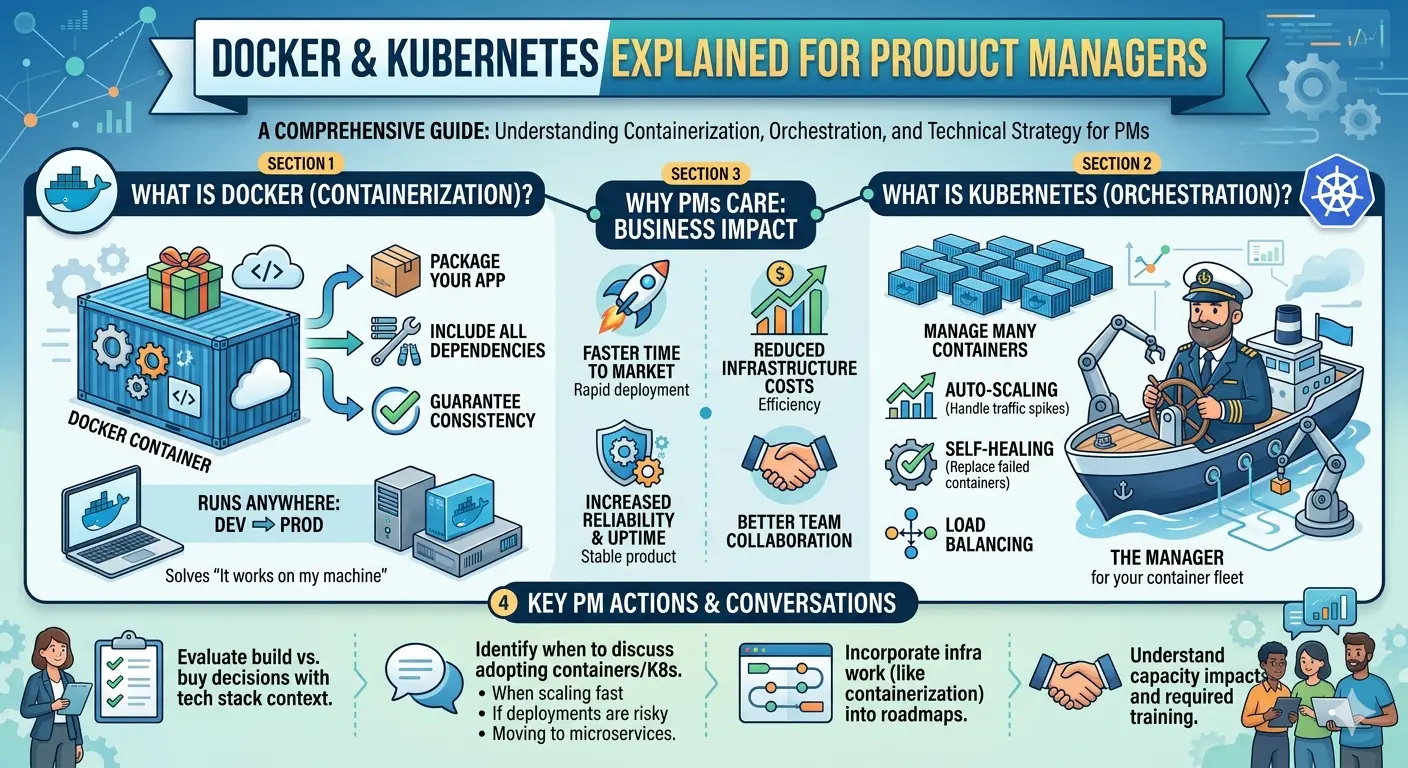
- Docker Explained: The Shipping Container Analogy
- Kubernetes: Orchestrating at Scale
- Real-World Use Cases and Benefits
- When Your Team Should Adopt Containers
- Cost and Complexity Considerations
- Questions to Ask Your Engineering Team
- Key Terminology Glossary
- Summary for Product Decision-Makers
Why Containers Matter for Products
Last year, I watched a product launch fail spectacularly. The team had spent six months building a new feature, tested it thoroughly in development, and deployed it confidently to production.
And then everything broke.
The bug? A library version mismatch. The feature worked perfectly in the dev environment but crashed in production because the production server had a slightly different version of a critical dependency. A version that behaved differently enough to cause cascading failures.
The cost: Three days of downtime, angry customers, and a rushed rollback that introduced new bugs.
The naked truth: This failure was entirely preventable. Containers exist specifically to solve this problem.
Containers eliminate the “works on my machine” problem by packaging applications with everything they need to run—consistently, everywhere.
As a product manager, you might think containers are “just an engineering thing.” But understanding containers helps you:
- Anticipate deployment risks before they become incidents
- Evaluate technical trade-offs in build vs. buy decisions
- Understand team capacity (container adoption requires investment)
- Communicate credibly with stakeholders about technical decisions
- Make better roadmap decisions that account for infrastructure realities
This isn’t about becoming a DevOps engineer. It’s about understanding the technology that powers how your product gets to users.
Let me explain containers the way I wish someone had explained them to me—honestly, simply, and with product impact in mind.
The Problem Containers Solve
Before we talk about what containers are, let’s be clear about the problem they solve.
The Deployment Nightmare
In the old world (and still in many companies), deploying software looked like this:
1. Developer builds application on their laptop
2. Application works perfectly on developer's machine
3. Developer hands off to operations team
4. Operations deploys to production server
5. Application crashes or behaves strangely
6. Hours of debugging: "But it works on my machine!"
Why does this happen?
The production environment is never identical to the development environment:
| Factor | Dev Machine | Production Server |
|---|---|---|
| Operating System | macOS / Windows | Linux |
| Library Versions | Latest | Older versions |
| Configuration | Developer’s preferences | Production settings |
| Network | Office WiFi | Corporate network |
| Dependencies | Everything installed fresh | Existing system packages |
The mismatch creates unpredictable behavior.
The Dependency Hell
Let me show you how bad this can get:
# Developer's machine (everything works)
Python version: 3.11.2
Library A: 2.4.1
Library B: 1.2.0 (compatible with Library A 2.4.1)

# Production server (disaster)
Python version: 3.9.5
Library A: 2.4.1
Library B: 0.9.2 (older version, incompatible with Library A 2.4.1)

# Result: Runtime errors that didn't exist in development
Now multiply this by hundreds of dependencies.
The Traditional “Solution”: Virtual Machines
Before containers, teams used Virtual Machines (VMs) to solve this problem:
VM Approach:
┌─────────────────────────────────────────┐
│ Virtual Machine                         │
│ ┌─────────────────────────────────────┐ │
│ │ Application + All Dependencies      │ │
│ │ ┌─────────────────────────────────┐ │ │
│ │ │ Guest Operating System          │ │ │
│ │ └─────────────────────────────────┘ │ │
│ └─────────────────────────────────────┘ │
│ Hypervisor                              │
└─────────────────────────────────────────┘
│ Host Operating System                   │
│ Physical Server                         │
└─────────────────────────────────────────┘
The problem with VMs:
- Each VM needs a full operating system (GBs of disk space)
- VMs take minutes to start up
- Running many VMs is resource-intensive
- Managing VM images is complex
VMs solved the consistency problem but created a new one: resource inefficiency.
Enter Containers
Containers solve the consistency problem without the VM overhead:
Container Approach:
┌──────────┐ ┌──────────┐ ┌──────────┐
│ Container│ │ Container│ │ Container│
│ App A    │ │ App B    │ │ App C    │
└──────────┘ └──────────┘ └──────────┘
┌─────────────────────────────────────┐
│ Container Runtime (Docker)          │
└─────────────────────────────────────┘
┌─────────────────────────────────────┐
│ Host Operating System               │
│ Physical Server / Cloud Instance    │
└─────────────────────────────────────┘
Containers:
- Share the host operating system (no guest OS needed)
- Start in seconds, not minutes
- Use a fraction of the resources
- Package everything needed to run the application
Docker Explained: The Shipping Container Analogy
The best way to understand Docker is the shipping container analogy. It’s cliché because it’s perfect.
The Shipping Container Revolution
Before 1956, shipping goods was a nightmare:
- Goods packed in wooden crates, barrels, bags
- Each shipment required custom handling
- Loading a ship took weeks
- Theft was rampant
- Transfer between truck, train, and ship required complete repacking
The shipping container changed everything:
- Standard size (20 or 40 feet)
- Works on any ship, train, or truck
- Sealed for security
- Loaded in hours, not weeks
- No repacking needed between transport modes
The impact: Global shipping costs dropped 90%. International trade exploded.
Docker Is a Shipping Container for Software
Docker does for software what shipping containers did for global trade:
# A Dockerfile - the "packing list" for your container
FROM python:3.11-slim          # Base "container" (like a standard 40ft container)

WORKDIR /app                   # Set working directory

COPY requirements.txt .        # Add your goods
RUN pip install -r requirements.txt

COPY . .                       # Add your application

CMD ["python", "app.py"]       # What runs when container starts
What this creates:
A self-contained package with:
- Your application code
- All dependencies (exact versions)
- The runtime environment (Python)
- Configuration
- Everything needed to run
This package runs identically everywhere:
- Developer’s laptop? Works.
- Test environment? Works.
- Production server? Works.
- Different cloud provider? Works.
Docker in Action
Here’s what using Docker looks like in practice:
# Build the container image (pack the shipping container)
docker build -t my-app:v1.0 .

# Run the container (ship it)
docker run -p 8080:80 my-app:v1.0

# The application is now running, isolated and consistent
# No "works on my machine" problems
What just happened:
- Docker read the Dockerfile
- Built an “image” (a blueprint for containers)
- Created a running “container” from that image
- The container runs in complete isolation with everything it needs
Key Docker Concepts for PMs
| Concept | Analogy | What It Means |
|---|---|---|
| Image | Blueprint | A template for creating containers. Immutable. |
| Container | Instance | A running image. Like a VM but lighter. |
| Dockerfile | Packing list | Instructions for building an image. |
| Registry | Warehouse | Where images are stored and shared (Docker Hub, ECR, GCR). |
| Build | Manufacturing | Creating an image from a Dockerfile. |
| Run | Deploy | Starting a container from an image. |
Why This Matters for Products
Docker transforms deployment from an art to a science. Instead of hoping your application works in production, you guarantee it works the same way everywhere.
Product benefits:
- Faster deployments: New environments spin up in seconds
- Consistent behavior: Development matches production
- Easier scaling: Add more containers, no configuration
- Simplified rollbacks: Switch to previous image version instantly
- Better developer onboarding: New engineers start with working environment
Kubernetes: Orchestrating at Scale
Docker is great for running one container. But what about running hundreds? What about when containers crash? What about scaling up for traffic spikes?
Enter Kubernetes (K8s).
The Container Orchestration Problem
Imagine you’re running an e-commerce platform:
Your application needs:
- 3 instances of the web frontend
- 2 instances of the API backend
- 1 instance of the background job processor
- 1 Redis cache
- 1 PostgreSQL database

With Docker alone:
- You start each container manually
- If one crashes, you restart it manually
- Traffic spikes? You add containers manually
- Rolling updates? You update each container manually
- Something fails at 3 AM? You wake up and fix it manually
This doesn’t scale.
Kubernetes: The Conductor
If Docker containers are the musicians, Kubernetes is the conductor. It coordinates everything:
# A Kubernetes deployment - telling K8s what you want
apiVersion: apps/v1
kind: Deployment
metadata:
  name: web-frontend
spec:
  replicas: 3                    # Run 3 copies
  selector:
    matchLabels:
      app: web-frontend
  template:
    metadata:
      labels:
        app: web-frontend
    spec:
      containers:
      - name: web-frontend
        image: my-app/web:v1.0   # Docker image to use
        ports:
        - containerPort: 80
        resources:
          requests:
            memory: "256Mi"
            cpu: "250m"
          limits:
            memory: "512Mi"
            cpu: "500m"
What Kubernetes does with this:
- Creates 3 identical containers
- Distributes them across available servers
- Monitors their health
- Restarts them if they crash
- Scales them up or down based on load
- Updates them gradually when you deploy new versions
Kubernetes Capabilities
| Capability | What It Means | Why It Matters |
|---|---|---|
| Auto-scaling | Adds/removes containers based on load | Handle traffic spikes without manual intervention |
| Self-healing | Restarts failed containers automatically | 3 AM crashes don’t wake anyone up |
| Rolling updates | Updates containers gradually, zero downtime | Users never experience maintenance windows |
| Service discovery | Containers find each other automatically | No hardcoded IP addresses |
| Load balancing | Distributes traffic across containers | No single point of failure |
| Secret management | Securely stores credentials | Sensitive data isn’t in code |
| Resource management | Allocates CPU/memory efficiently | Cost optimization |
The Mental Model
Traditional Deployment:
Server → Application (hope nothing breaks)

Docker Deployment:
Server → Container → Application (consistent, but manual)

Kubernetes Deployment:
Cluster → Kubernetes → Multiple Servers → Multiple Containers → Application
         (automated, self-healing, scalable)
A Real Example: Handling Black Friday Traffic
Let’s say your e-commerce platform normally runs with:
Normal traffic:
- 3 web frontend containers
- 2 API containers
- 1 job processor container
Black Friday hits. Traffic spikes 10x.
Without Kubernetes:
1. Alerts fire at 3 AM
2. On-call engineer wakes up
3. Manually adds more servers
4. Manually deploys more containers
5. Configures load balancer
6. Prays it holds
7. Traffic drops, over-provisioned servers waste money
With Kubernetes:
# Auto-scaling configuration
apiVersion: autoscaling/v2
kind: HorizontalPodAutoscaler
metadata:
  name: web-frontend-scaler
spec:
  scaleTargetRef:
    apiVersion: apps/v1
    kind: Deployment
    name: web-frontend
  minReplicas: 3
  maxReplicas: 50                    # Scale up to 50 containers
  metrics:
  - type: Resource
    resource:
      name: cpu
      target:
        type: Utilization
        averageUtilization: 70       # Scale when CPU hits 70%
What happens automatically:
1. Traffic increases
2. Container CPU rises above 70%
3. Kubernetes adds more containers (up to 50)
4. Load balancer distributes traffic
5. Traffic decreases after sale ends
6. Kubernetes removes extra containers
7. Costs return to normal

No 3 AM wake-up. No manual intervention.
Kubernetes isn’t just about reliability. It’s about building systems that manage themselves.
Real-World Use Cases and Benefits
Let’s look at specific scenarios where containers and Kubernetes deliver product value.
Use Case 1: Microservices Architecture
The Problem: A monolithic application becomes hard to maintain. You want to break it into smaller services, but each service needs its own dependencies and runtime.
The Container Solution:
# Each microservice in its own container
services:
  user-service:
    image: company/user-service:v2.1
    environment:
      DB_HOST: users-db

  order-service:
    image: company/order-service:v1.8
    environment:
      DB_HOST: orders-db
      KAFKA_BROKER: kafka:9092

  payment-service:
    image: company/payment-service:v3.0
    environment:
      STRIPE_KEY: ${STRIPE_SECRET_KEY}
Product Benefits:
- Each team can deploy independently
- Services scale independently (payment needs more capacity? Scale just that service)
- Failures are isolated (payment service crash doesn’t take down user login)
- Technology flexibility (user service in Python, payment service in Go)
Use Case 2: Development Environment Consistency
The Problem: Every developer has a slightly different setup. “Works on my machine” is a daily occurrence. Onboarding new developers takes days of environment configuration.
The Container Solution:
# Developer runs ONE command
docker-compose up

# This spins up:
# - Application container
# - Database container
# - Cache container
# - Local queue

# Complete development environment in 30 seconds
Product Benefits:
- New developer onboarding: hours, not days
- Zero “works on my machine” bugs
- Anyone can run anyone else’s code
- Environment matches production
Use Case 3: CI/CD Pipelines
The Problem: CI/CD pipelines are slow and inconsistent. Tests fail due to environment differences, not actual bugs.
The Container Solution:
# GitHub Actions with Docker
jobs:
  test:
    runs-on: ubuntu-latest
    container:
      image: python:3.11-slim
    steps:
      - uses: actions/checkout@v4
      - run: pip install -r requirements.txt
      - run: pytest
      - run: mypy .
Product Benefits:
- Faster test runs (no environment setup each time)
- Consistent test results
- Parallel testing in isolated containers
- Faster feedback loop = faster development
Use Case 4: Multi-Cloud Strategy
The Problem: You want to avoid vendor lock-in. But deploying to AWS, GCP, and Azure requires different approaches.
The Container Solution:
# Same container runs everywhere
# Deploy to AWS EKS
kubectl apply -f k8s/

# Deploy to GCP GKE
kubectl apply -f k8s/

# Deploy to Azure AKS
kubectl apply -f k8s/

# Exact same containers, same configuration
Product Benefits:
- No vendor lock-in
- Leverage best pricing across clouds
- Disaster recovery across regions and providers
- Negotiate better contracts with cloud providers
Use Case 5: Batch Processing and Jobs
The Problem: You need to run periodic data processing jobs, but managing job execution, retries, and scaling is complex.
The Kubernetes Solution:
# Kubernetes Job for batch processing
apiVersion: batch/v1
kind: Job
metadata:
  name: daily-report-generator
spec:
  ttlSecondsAfterFinished: 100
  template:
    spec:
      containers:
      - name: report-generator
        image: company/report-gen:v1.0
        command: ["python", "generate_daily_report.py"]
      restartPolicy: OnFailure
Product Benefits:
- Automatic retry on failure
- Resource cleanup after completion
- Scaled execution for large jobs
- No dedicated job processing infrastructure
When Your Team Should Adopt Containers
Containers aren’t always the right choice. Here’s when to push for adoption—and when to wait.
Clear Signals to Adopt
Signal 1: You’re Hitting Deployment Pain
Warning signs:
✓ Deployments take hours
✓ Rollbacks are frequent and painful
✓ "Works on my machine" is a common excuse
✓ Development and production behave differently
✓ New environment setup takes days
Signal 2: You’re Moving to Microservices
Containers are essential for microservices:
- Each service needs isolated dependencies
- Independent scaling requires container-level granularity
- Service isolation for fault tolerance
Signal 3: You Need to Scale Fast
If you're anticipating rapid growth:
- Containers scale in seconds
- Kubernetes auto-scaling handles spikes
- Cost scales with usage, not provisioning
Signal 4: You Have Multiple Services to Manage
Managing 10+ services manually is unsustainable.
Kubernetes provides:
- Unified management interface
- Consistent deployment process
- Centralized monitoring
When to Wait
Signal 1: You’re Pre-Product-Market Fit
Priority: Find product-market fit
Container investment: Weeks of engineering time
Opportunity cost: Too high

Wait until you have clear signals of product viability.
Signal 2: Your Team Has Zero Container Experience
Kubernetes learning curve: 3-6 months to proficiency
Risk: Poor implementation, security vulnerabilities
Alternative: Use managed services (AWS ECS, Google Cloud Run)

Consider hiring or training before DIY Kubernetes.
Signal 3: Your Application Is Simple
Simple monolithic application
+ Stable traffic
+ Small team
+ No scaling needs

= Containers add complexity without benefit
The Decision Framework
Should we adopt containers?

1. Are we experiencing deployment pain?
   └─ Yes → Proceed to question 2
   └─ No → Wait

2. Is our team ready for the learning curve?
   └─ Yes → Proceed to question 3
   └─ No → Invest in training first

3. Do we have the resources to do it right?
   └─ Yes → Proceed to question 4
   └─ No → Start with managed container services

4. Is the timing right for our product stage?
   └─ Yes → Proceed with adoption
   └─ No → Add to technical roadmap for later
Cost and Complexity Considerations
Containers and Kubernetes aren’t free. Here’s the honest assessment of costs and complexity.
Infrastructure Costs
Container Infrastructure (Running):
| Component | Cost Range (Monthly) | Notes |
|---|---|---|
| Container Registry | $0-200 | Docker Hub free tier, ECR/ECR paid |
| Kubernetes Cluster | $150-500+ | Managed K8s on EKS/GKE/AKS |
| Compute (Containers) | Variable | Same as running servers, but potentially more efficient |
| Networking (Load balancers, etc.) | $50-300 | Kubernetes adds networking complexity |
Hidden Costs:
What often gets missed:
- Storage for container images (grows with each build)
- Network transfer between containers
- Logging and monitoring for containerized apps
- CI/CD pipeline resources for container builds
Complexity Costs
Initial Adoption:
Typical adoption timeline:
Week 1-2: Learning and experimentation
Week 3-4: Development environment containerization
Week 5-8: Production migration for first service
Week 9-12: Full migration and optimization

Engineering investment: 200-400 hours for small team
At $100/hour fully loaded: $20,000-40,000 in engineering time
Ongoing Maintenance:
Kubernetes maintenance tasks:
- Cluster upgrades (quarterly)
- Security patching
- Certificate management
- Performance tuning
- Capacity planning
- Monitoring and alerting maintenance

Estimate: 10-20% of one engineer's time ongoing
The Value Equation
Containers are an investment, not an expense. The question isn’t “what do they cost?” It’s “what do they cost relative to the problems they solve?”
Calculate your current costs:
| Current Problem | Hours Lost Per Month | Dollar Cost |
|---|---|---|
| Deployment debugging | ||
| Environment inconsistency | ||
| Manual scaling | ||
| Failed deployments | ||
| On-call incidents | ||
| Total |
If containerization saves more than it costs, the ROI is positive.
Questions to Ask Your Engineering Team
Here are questions that show you understand the domain and help drive better decisions.
Adoption Decision Questions
Technical Readiness:
- “What percentage of our services would be straightforward to containerize?”
- “Which services have dependencies that would be problematic in containers?”
- “Do we have the in-house expertise, or do we need to invest in training?”
Business Impact:
- “What problems would containerization solve for us today?”
- “How would this change our deployment frequency?”
- “What’s the risk of not adopting containers?”
Resource Questions:
- “What’s the realistic timeline for a full migration?”
- “How much engineering capacity would this require?”
- “Should we consider managed Kubernetes or self-hosted?”
Operational Questions
For Existing Container Users:
- “How are we handling container security?”
- “What’s our strategy for image scanning and vulnerability management?”
- “How do we handle secrets and credentials in containers?”
- “What’s our container cost breakdown?”
For Kubernetes Users:
- “Are we over-provisioned? What’s our actual resource utilization?”
- “How are we handling cluster upgrades and maintenance?”
- “What’s our disaster recovery plan for the cluster?”
- “Are there services that don’t need to be on Kubernetes?”
Strategic Questions
- “Are we using containers to enable better architecture, or just lifting and shifting problems?”
- “How does our container strategy align with our multi-cloud goals?”
- “What capabilities do containers unlock for us that we’re not yet using?”
Key Terminology Glossary
Here’s a quick reference for the terms you’ll hear in technical discussions.
Docker Terms
| Term | Definition |
|---|---|
| Container | A running instance of an image; isolated, lightweight, portable |
| Image | A read-only template used to create containers; built from Dockerfile |
| Dockerfile | A text file with instructions to build a Docker image |
| Registry | A storage and distribution system for Docker images (Docker Hub, ECR, GCR) |
| Build | The process of creating an image from a Dockerfile |
| Tag | A label applied to images for versioning (e.g., v1.0, latest) |
| Volume | Persistent storage that survives container restarts |
| Network | Isolated network layer for container communication |
| Docker Compose | A tool for defining and running multi-container applications |
Kubernetes Terms
| Term | Definition |
|---|---|
| Cluster | A set of nodes (servers) that run containerized applications |
| Node | A worker machine in Kubernetes (virtual or physical) |
| Pod | The smallest deployable unit; one or more containers sharing resources |
| Deployment | Manages replicas of a pod; handles updates and scaling |
| Service | An abstraction that exposes an application running on pods |
| Ingress | Manages external access to services (HTTP/HTTPS routing) |
| ConfigMap | Stores configuration data as key-value pairs |
| Secret | Stores sensitive data (passwords, tokens, keys) |
| Namespace | Virtual cluster for organizing resources |
| Helm | A package manager for Kubernetes |
| Operator | A method of packaging, deploying, and managing Kubernetes applications |
Architecture Terms
| Term | Definition |
|---|---|
| Microservices | Architectural style with small, independent services |
| Monolith | Single unified application codebase |
| Service Mesh | Infrastructure layer for service-to-service communication |
| Sidecar | A container that runs alongside the main application container |
| Blue-Green Deployment | Deployment strategy with two identical production environments |
| Canary Deployment | Gradual rollout to a subset of users before full release |
Summary for Product Decision-Makers
Let’s bring this together with actionable takeaways.
The Core Concepts
Docker solves the “works on my machine” problem by packaging applications with everything they need to run consistently.
Kubernetes solves the “running containers at scale” problem by orchestrating deployment, scaling, and management automatically.
The Business Impact
| Capability | Without Containers | With Containers + Kubernetes |
|---|---|---|
| Deployment time | Hours to days | Minutes |
| Environment consistency | Low | High |
| Scaling | Manual, slow | Automatic, fast |
| Recovery from failures | Manual intervention | Self-healing |
| Resource efficiency | Over-provisioned | Right-sized |
| Team velocity | Slowed by infrastructure issues | Focused on product |
The Adoption Reality
Containers are worth it when:
- You have deployment pain
- You’re scaling a microservices architecture
- Your team has capacity to learn
- You can invest in doing it right
Containers can wait when:
- You’re pre-product-market fit
- Your application is simple and stable
- Your team lacks experience and can’t invest in learning
- Current deployment processes are working fine
Your Role as a Product Manager
You don’t need to be a Docker or Kubernetes expert. But you should:
- Understand the value proposition so you can prioritize infrastructure work appropriately
- Ask informed questions that help your team make better decisions
- Account for container complexity in roadmap planning
- Recognize when container adoption would solve real problems vs. being resume-driven development
- Support your team’s learning if they’re building these skills
The best product managers don’t just accept technical decisions—they understand them well enough to advocate for the right investments.
The Bottom Line
Containers and Kubernetes are infrastructure investments that pay off through faster, more reliable deployments and better scalability. They’re not always the right choice, but for growing products with deployment complexity, they’re increasingly table stakes.
The companies winning at product delivery—the ones shipping daily without constant firefighting—are almost certainly using containers. The question for you is: is your product ready for that level of sophistication, and can you make the business case for the investment?
Ready to have a better conversation with your engineering team? Share this with them and start the discussion.
Related Reading:
- How to Become a Technical Product Manager: Step-by-Step Guide
- Jenkins vs GitHub Actions: A Product Manager’s Comparison
- Blue-Green vs Canary Deployments: Choosing the Right Strategy
About the Author
Karthick Sivaraj is the founder of The Naked PM, a blog focused on DevOps for Product Managers. After years of watching product managers struggle to understand the infrastructure decisions affecting their products, he created this resource to bridge the gap. He believes every PM should understand the technology stack their product runs on—not to become engineers, but to make better decisions.
Questions about containers or Kubernetes? Drop a comment below or reach out on Twitter/X.
💬 Join the Conversation