Table of Contents
- Introduction: Why RAG Matters for AI Products
- The Problem: LLM Limitations
- What is RAG? Simple Explanation
- How RAG Works: A PM’s Perspective
- When to Use RAG in Your Products
- RAG vs Fine-Tuning: Decision Framework
- Building RAG Systems: Components Overview
- Cost and Performance Considerations
- Real-World RAG Product Examples
- Getting Started with RAG Products
Introduction: Why RAG Matters for AI Products
Your CEO just returned from a conference. “We need AI in our product,” she announces. “Everyone’s doing it. Our competitors have chatbots. What are we waiting for?”
Six months later, your team ships a chatbot. It’s powered by a large language model. It sounds impressive in demos. But in production? It hallucinates facts about your products. It gives outdated information. It confidently states things that are completely wrong.
Customers are confused. Support tickets are up. Your CEO is asking why the AI keeps making things up.
Welcome to the LLM limitation problem.
And welcome to why RAG—Retrieval Augmented Generation—has become one of the most important techniques in AI product development.
RAG isn’t a buzzword. It’s a practical solution to a real problem: large language models don’t know your business. They were trained on the public internet, not on your product documentation, your policies, your customer data, or your domain expertise.
The Naked Truth: If you’re building an AI product that needs to be accurate about specific information—company policies, product details, technical documentation—you’re probably going to need RAG. The alternative is an AI that sounds confident while being wrong.
In this guide, we’ll demystify RAG from a Product Manager’s perspective. No machine learning PhD required. Just practical understanding of what RAG is, when to use it, and how to think about building RAG-powered products.
Let’s dive in.
The Problem: LLM Limitations
To understand why RAG matters, you need to understand what large language models can’t do.
The Training Data Cutoff
Here’s a fundamental limitation: LLMs have a knowledge cutoff date.
GPT-4’s training data ended in April 2023 (depending on the version). Claude’s knowledge has a cutoff. Every model has a point in time after which it knows nothing about the world.
Ask an LLM about a product launched last month? It doesn’t know. Ask about a policy change implemented yesterday? It’s clueless. Ask about your company’s specific procedures? Unless they were famous enough to be in the training data, it won’t know.
This isn’t a bug. It’s a fundamental characteristic of how these models work.
The Hallucination Problem
LLMs generate text by predicting likely next words. They’re not looking up facts—they’re generating plausible-sounding text.
This leads to hallucinations: confident statements that are completely fabricated.
Example: Ask an LLM about a fictional product feature you never built. Many models won’t say “I don’t know.” They’ll make up a plausible-sounding feature description.
For consumer applications, this might be acceptable. ChatGPT making up a fun story is fine. But for enterprise applications? For customer support? For medical or legal advice? Hallucinations are a dealbreaker.
The Context Window Limitation
LLMs have a limit on how much text they can process at once—the “context window.”
Even with models like GPT-4 Turbo offering 128K tokens (roughly 300 pages of text), you can’t just dump all your company’s documentation into every query. It’s too slow, too expensive, and not scalable.
The Private Data Problem
LLMs were trained on public data. They don’t know about:
- Your company’s internal documentation
- Your customers’ specific situations
- Your products’ latest features
- Your industry’s specialized knowledge
This is the gap RAG fills.
The Naked Truth: An LLM without access to your specific data is like a smart intern who’s never read your company’s documentation. They might give great general advice, but they’ll be wrong about anything specific to your business.
What is RAG? Simple Explanation
Let’s make this simple.
The Analogy
Imagine you’re taking an open-book exam. You have two options:
Option 1: Memorize everything beforehand. Study the textbook until you know every fact. This is like training or fine-tuning an LLM on your data.
Option 2: Look things up during the exam. Keep the textbook with you and find relevant information when you need it. This is RAG.
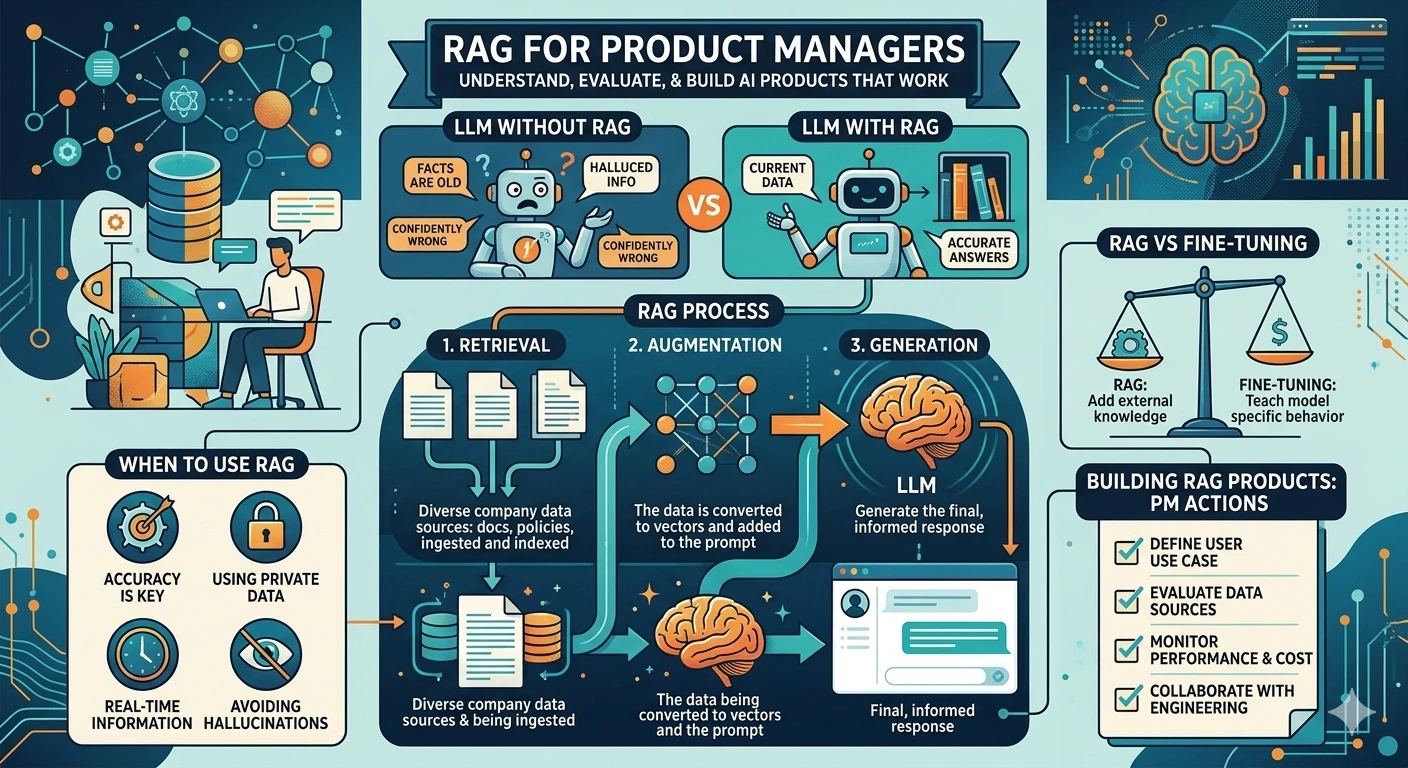
RAG = Retrieval Augmented Generation
Let’s break down the name:
- Retrieval: Find relevant information from your knowledge base
- Augmented: Add that information to the LLM’s context
- Generation: Let the LLM generate a response using the retrieved information
How It Works (Simplified)
Here’s the RAG process in plain English:
User asks a question: “What’s our return policy for electronics?”
System searches your documents: The system looks through your company’s policy documents, FAQs, and knowledge base to find relevant information.
System retrieves relevant chunks: It finds the relevant sections—maybe the return policy page and some FAQ entries about electronics returns.
System adds context to the LLM: It sends the user’s question plus the retrieved documents to the LLM.
LLM generates answer: The LLM answers using the provided context, not just its training data.
The result: an answer grounded in your actual documentation, not the LLM’s potentially outdated or incorrect training data.
Why This Matters for PMs
RAG transforms LLMs from general-purpose chatbots into knowledge-grounded assistants that can answer questions about your specific domain.
This opens up product possibilities:
- Customer support bots that answer from your actual knowledge base
- Internal assistants that know your company’s policies and procedures
- Product guides that reference your actual documentation
- Code assistants that understand your specific codebase
The Naked Truth: RAG doesn’t eliminate hallucinations. An LLM can still make things up even when given correct information. But RAG dramatically reduces hallucinations by grounding responses in retrieved context. You can also trace answers back to source documents—a huge advantage for accountability.
How RAG Works: A PM’s Perspective
Let’s go deeper into how RAG systems actually work. You don’t need to understand every technical detail, but you do need to understand enough to make good product decisions.
The Components of a RAG System
A RAG system has three main parts:
1. Document Processing (The Indexing Pipeline)
Before you can retrieve information, you need to make it searchable. This happens in the indexing pipeline:
- Document collection: Gather your documents—PDFs, web pages, databases, wikis, etc.
- Chunking: Split documents into smaller pieces. You can’t search an entire 100-page manual efficiently, so you break it into chunks (typically 500-1500 characters).
- Embedding: Convert each chunk into a vector—a list of numbers that represents the chunk’s meaning. This is done by an embedding model.
- Storage: Store the vectors in a vector database.
2. Retrieval (The Search Pipeline)
When a user asks a question:
- Query embedding: Convert the user’s question into a vector using the same embedding model.
- Similarity search: Find the document chunks whose vectors are most similar to the question vector. This is “semantic search”—finding chunks with similar meaning, not just matching keywords.
- Top-k retrieval: Return the k most relevant chunks (typically 3-10 chunks).
3. Generation (The Answer Pipeline)
- Prompt construction: Create a prompt that includes the user’s question and the retrieved chunks.
- LLM generation: Send the prompt to the LLM, which generates an answer grounded in the retrieved context.
The Vector Database: A Key Concept
Vector databases are specialized databases designed to store and search vectors efficiently. They’re fundamental to RAG systems.
Popular vector databases include:
- Pinecone: Managed service, easy to start
- Weaviate: Open source, powerful features
- Milvus: Open source, scalable
- Qdrant: Open source, Rust-based
- Chroma: Lightweight, good for development
As a PM, you don’t need to pick the vector database yourself. But you should understand that the choice of vector database affects your system’s performance, cost, and scalability.
Embedding Models: The Secret Sauce
Embedding models convert text into vectors. The quality of your embeddings directly affects retrieval quality.
Popular embedding models:
- OpenAI text-embedding-3-small/large: Good quality, easy to use
- Cohere embed models: Strong performance, specialized options
- Sentence Transformers (open source): Free, run locally, various sizes
The choice of embedding model affects:
- Retrieval quality: Better embeddings mean more relevant results
- Cost: Some models charge per token
- Latency: Local models are faster but might be lower quality
Retrieval Strategies: Beyond Basic Search
Basic RAG uses simple similarity search. But more sophisticated systems use multiple strategies:
Hybrid Search: Combine semantic search (vector similarity) with keyword search (BM25). This catches cases where semantic search misses exact matches.
Re-ranking: After initial retrieval, use a second model to re-rank results by relevance. This improves precision.
Multi-query: Generate multiple variations of the user’s question, retrieve for each, and combine results. This handles cases where the original query is ambiguous.
Metadata filtering: Filter by document metadata (date, category, author) before retrieval. This is essential when you need to restrict results to certain sources.
The Naked Truth: A basic RAG implementation is straightforward. A production-grade RAG system with good retrieval quality requires significant tuning and optimization. Don’t underestimate the gap between demo and production.
When to Use RAG in Your Products
RAG isn’t the solution to every AI problem. Here’s when it makes sense:
RAG Is Right When:
1. You need factual accuracy about specific information
If your AI needs to answer questions about your products, policies, procedures, or domain—and accuracy matters—RAG is essential. Customer support bots, internal knowledge assistants, and documentation helpers all fit here.
2. Your information changes frequently
Fine-tuning an LLM requires retraining every time your data changes. RAG just requires updating your document index. If your policies, products, or documentation change often, RAG is more practical.
3. You need to trace answers to sources
With RAG, you can show users which document an answer came from. This builds trust and allows verification. For regulated industries, this auditability might be required.
4. You have a lot of domain-specific content
If you have thousands of documents, articles, or data points that the LLM needs to reference, RAG is more practical than trying to train all that information into a model.
5. You need to control what the AI can discuss
RAG systems only retrieve from your indexed documents. If you want to ensure your AI doesn’t discuss certain topics or only uses approved sources, RAG gives you that control.
RAG Might Not Be Right When:
1. You need creative generation, not factual answers
If you’re building a creative writing assistant, brainstorming tool, or general chatbot, RAG might be overkill. The LLM’s general knowledge might be sufficient.
2. You need real-time or highly dynamic data
RAG indexes documents ahead of time. If your data changes every second (like stock prices or live sensor data), you need a different approach—perhaps real-time API integration rather than document retrieval.
3. You need the AI to learn a specific style or format
Fine-tuning is better for teaching an LLM to write in a specific style, format, or voice. RAG provides facts; fine-tuning provides patterns.
4. You have no documents to retrieve from
RAG requires a knowledge base to search. If you’re starting from scratch, you need to build that knowledge base first.
Decision Matrix
| Requirement | RAG | Fine-Tuning | Hybrid |
|---|---|---|---|
| Factual accuracy about specific content | ✅ Best | ❌ Poor | ✅ Good |
| Information changes frequently | ✅ Easy update | ❌ Hard update | ✅ Good |
| Specific style or format needed | ❌ Limited | ✅ Best | ✅ Good |
| Real-time data | ❌ Not suitable | ❌ Not suitable | ⚠️ API integration |
| Traceable sources | ✅ Built-in | ❌ No | ✅ Built-in |
| Limited compute budget | ⚠️ Moderate | ❌ Expensive | ⚠️ Moderate |
RAG vs Fine-Tuning: Decision Framework
This is one of the most common questions I get from product teams: “Should we use RAG or fine-tune an LLM?”
Let’s clarify what fine-tuning actually means.
What Fine-Tuning Does
Fine-tuning takes a pre-trained LLM and trains it further on your specific data. This teaches the model:
- New patterns and styles
- Domain-specific language
- Specific output formats
What fine-tuning does NOT do:
- Add new factual knowledge reliably (this is a common misconception)
- Update information without retraining
- Provide source traceability
The Knowledge vs. Behavior Distinction
Think of it this way:
- RAG adds knowledge: It gives the LLM access to specific information at inference time.
- Fine-tuning changes behavior: It teaches the LLM how to respond, not what to know.
If you need your AI to know about your company’s return policy, use RAG. If you need your AI to sound like your brand voice, use fine-tuning.
The Hybrid Approach
You can combine RAG and fine-tuning:
- Fine-tune a base model on your domain language, style, and output formats.
- Add RAG to provide factual, up-to-date information.
This gives you the best of both worlds: an AI that speaks your language AND knows your facts.
Practical Decision Framework
Ask these questions:
Q1: Do I need the AI to know specific facts that aren’t in the LLM’s training data?
- Yes → You need RAG (or a hybrid approach)
Q2: Do I need the AI to produce outputs in a specific style or format?
- Yes → Consider fine-tuning (or a hybrid approach)
Q3: Does my information change frequently?
- Yes → RAG is much more practical than fine-tuning
Q4: Do I need to trace answers to specific sources?
- Yes → RAG is required
Q5: What’s my budget?
- RAG: Ongoing costs for embedding API calls and vector database
- Fine-tuning: High upfront cost for training, lower inference cost
The Cost Reality
Let’s talk money:
RAG Costs:
- Embedding API calls: ~$0.02 per 1M tokens (OpenAI text-embedding-3-small)
- Vector database: $0 (self-hosted) to hundreds per month (managed)
- LLM API calls: Same as non-RAG usage
- Storage: Depends on data volume
Fine-Tuning Costs:
- Training: $100s to $10,000s depending on model size and data volume
- Inference: Often higher than base model (for custom models)
- Updates: Same training cost again every time you update
The Naked Truth: For most product applications, RAG is the more practical choice. Fine-tuning has its place, but it’s often overkill for simply “making the AI know about our stuff.” Start with RAG, add fine-tuning if you have specific style or format requirements.
Building RAG Systems: Components Overview
Let’s walk through what you actually need to build a RAG system. This isn’t a tutorial—it’s a PM’s guide to understanding the components and decisions involved.
Component 1: Document Processing Pipeline
What it does: Ingests your documents and prepares them for retrieval.
Key decisions:
- Document sources: Where will documents come from? PDFs? Web pages? Databases? Internal wikis?
- Chunking strategy: How will you split documents? By paragraphs? By sections? Fixed character count? This affects retrieval quality significantly.
- Update frequency: How often will you re-index documents? Daily? Hourly? On-demand?
Engineering considerations:
- Document parsing quality (especially for PDFs)
- Handling different file formats
- Preserving document structure (headings, tables, images)
Component 2: Embedding Model
What it does: Converts text chunks and queries into vectors.
Key decisions:
- Model choice: OpenAI? Cohere? Open source? This affects quality, cost, and latency.
- Embedding dimensions: Larger dimensions = more information but more storage/compute. OpenAI’s small model uses 1536 dimensions; large uses 3072.
- Batch processing: How will you handle bulk embedding of documents?
Engineering considerations:
- API rate limits for commercial embedding services
- Latency for real-time query embedding
- GPU requirements for local embedding models
Component 3: Vector Database
What it does: Stores vectors and enables similarity search.
Key decisions:
- Hosted vs. self-hosted: Pinecone (hosted) vs. Milvus (self-hosted)?
- Scale requirements: How many vectors? How many queries per second?
- Metadata support: Do you need to filter by document metadata?
Engineering considerations:
- Indexing strategy (affects search speed vs. accuracy)
- Backup and disaster recovery
- Multi-tenancy if serving multiple customers
Component 4: Retrieval Logic
What it does: Finds relevant document chunks for a query.
Key decisions:
- Number of chunks (k): How many chunks to retrieve? Too few = missing relevant info. Too many = noise and token costs.
- Similarity threshold: Minimum similarity score to include a result.
- Retrieval strategy: Basic similarity? Hybrid search? Re-ranking?
Engineering considerations:
- Query expansion or rewriting for better retrieval
- Handling multi-part questions
- Deduplication of similar chunks
Component 5: Generation Logic
What it does: Uses retrieved context to generate answers.
Key decisions:
- LLM choice: GPT-4? Claude? Llama? Open source? This affects quality, cost, and latency.
- Prompt engineering: How to structure the prompt? How to instruct the LLM to use context?
- Citation behavior: Should the LLM cite sources? How?
Engineering considerations:
- Token limits (context window management)
- Handling cases where retrieval finds nothing relevant
- Response streaming for better UX
Component 6: Evaluation and Monitoring
What it does: Measures and improves system quality.
Key decisions:
- Metrics: How will you measure retrieval quality? Answer quality?
- Feedback loops: How will users provide feedback? How will you use it?
- Logging: What data will you log for analysis?
Engineering considerations:
- Building evaluation datasets
- A/B testing different configurations
- Monitoring for retrieval drift as documents change
Cost and Performance Considerations
Let’s talk about the practical realities of running RAG in production.
Cost Breakdown
Per-query costs:
Query embedding: Convert user question to vector
- OpenAI text-embedding-3-small: ~$0.02 per 1M tokens
- Typical query: ~50 tokens = $0.000001 per query
Vector search: Query the vector database
- Pinecone: ~$0.0001 per query at scale
- Self-hosted: Minimal marginal cost
Retrieved context: Tokens from retrieved chunks
- If retrieving 5 chunks of 500 tokens each = 2,500 tokens
LLM generation: Generate answer with context
- GPT-4 Turbo: $0.01 per 1K input tokens, $0.03 per 1K output tokens
- Typical RAG query: ~3K input tokens + ~500 output tokens = ~$0.045
Total per query: ~$0.05-0.10 for a typical RAG query with GPT-4.
Monthly costs at scale:
- 10,000 queries/day = ~$15,000-30,000/month
- Using GPT-3.5-turbo instead: ~$1,500-3,000/month
Performance Considerations
Latency breakdown:
- Query embedding: 50-200ms
- Vector search: 10-100ms
- LLM generation: 500-2000ms (streaming helps)
Total latency: 0.5-3 seconds for a complete response.
Optimization strategies:
- Use smaller/faster embedding models
- Cache embeddings for common queries
- Use streaming for faster perceived response
- Choose faster LLMs for simpler queries
Scaling Considerations
As you scale:
- Vector database becomes critical—choose one that handles your query volume
- Embedding API rate limits may require batching or local models
- LLM API costs dominate—consider open-source alternatives at scale
- Latency becomes a UX issue—implement streaming and caching
The Naked Truth: RAG isn’t free. At scale, it’s a significant infrastructure cost. Make sure your use case justifies the expense. A simple FAQ page might be more cost-effective than a RAG-powered chatbot for low-value queries.
Real-World RAG Product Examples
Let’s look at how companies are using RAG in production products:
Example 1: Customer Support Automation
The product: A chatbot that answers customer questions about products, orders, and policies.
How RAG is used:
- Knowledge base includes product manuals, FAQ pages, and policy documents
- User questions trigger retrieval from the knowledge base
- LLM generates answers grounded in the retrieved documents
- System provides links to source documents for verification
Business value:
- Reduced support ticket volume by 40%
- 24/7 support availability
- Consistent, accurate answers
Challenges:
- Maintaining up-to-date knowledge base
- Handling ambiguous questions
- Escalating to human agents when needed
Example 2: Internal Knowledge Assistant
The product: An AI assistant that helps employees find information across company systems.
How RAG is used:
- Connects to internal wikis, Google Drive, Slack, and document repositories
- Retrieves relevant documents based on natural language queries
- Generates summaries and answers with source citations
Business value:
- Reduced time searching for information
- Onboarding acceleration for new employees
- Knowledge preservation and access
Challenges:
- Access control and permissions
- Document quality and consistency
- Keeping index updated with new information
Example 3: Code Documentation Assistant
The product: An AI that helps developers understand and use a complex codebase or API.
How RAG is used:
- Indexes code files, documentation, and code comments
- Retrieves relevant code snippets and explanations
- Generates context-aware code examples and explanations
Business value:
- Faster developer onboarding
- Reduced support burden on engineering teams
- Better API adoption
Challenges:
- Code-specific chunking strategies
- Understanding code context
- Handling multiple code versions
Example 4: Research Assistant
The product: An AI that helps researchers find and synthesize information from papers and articles.
How RAG is used:
- Indexes academic papers, reports, and articles
- Retrieves relevant passages based on research questions
- Generates summaries with citations
Business value:
- Accelerated research process
- Comprehensive literature review
- Citation-backed answers
Challenges:
- PDF parsing quality
- Handling specialized domain language
- Ensuring citation accuracy
Getting Started with RAG Products
Ready to build a RAG-powered product? Here’s a practical roadmap:
Phase 1: Validate the Use Case (Week 1-2)
Before building anything, validate that RAG is the right approach:
- Is there a clear information retrieval need?
- Do users actually ask questions that RAG can answer?
- Is the information available in document form?
- Is accuracy important enough to justify the complexity?
Phase 2: Build a Minimal Prototype (Week 2-4)
Create the simplest possible RAG system:
- Start with a small set of documents (10-50)
- Use a managed vector database (Pinecone, Weaviate Cloud)
- Use OpenAI or similar APIs for embeddings and generation
- Build a simple chat interface
Test with real users. Learn what works and what doesn’t.
Phase 3: Improve Retrieval Quality (Week 4-8)
Retrieval quality is usually the biggest challenge. Focus on:
- Better chunking strategies
- Query expansion or rewriting
- Hybrid search (semantic + keyword)
- Re-ranking retrieved results
Measure retrieval quality with a test dataset.
Phase 4: Optimize for Production (Week 8-12)
Prepare for scale:
- Add monitoring and logging
- Implement feedback collection
- Optimize costs (consider cheaper models, caching)
- Add guardrails and safety measures
- Build proper error handling
Phase 5: Iterate Based on Data (Ongoing)
Use production data to improve:
- Analyze query patterns and failure cases
- Expand and update the knowledge base
- Fine-tune retrieval parameters
- Consider fine-tuning for style if needed
Key Success Factors
Start with high-quality documents: RAG can only retrieve what exists. Garbage in, garbage out.
Measure everything: Track retrieval quality, answer quality, and user satisfaction. You can’t improve what you don’t measure.
Set realistic expectations: RAG isn’t perfect. Be transparent with users about limitations.
Plan for maintenance: Documents change, queries evolve, models update. RAG systems need ongoing care.
Design for failure: What happens when retrieval fails? When the LLM hallucinates? Build graceful fallbacks.
Conclusion: RAG Is a Tool, Not a Solution
RAG is powerful. It’s the practical way to build AI products that need accurate, specific information. But it’s not magic, and it’s not a silver bullet.
Building a good RAG system requires:
- Quality documents to retrieve from
- Thoughtful chunking and indexing
- Tuned retrieval logic
- Careful prompt engineering
- Ongoing maintenance and improvement
The companies winning with AI aren’t the ones with the most sophisticated algorithms. They’re the ones who understand the tools, apply them to real problems, and iterate based on feedback.
The Naked Truth: RAG isn’t about having the fanciest AI. It’s about grounding AI in your actual knowledge so it can be useful for your specific use case. Start simple, measure rigorously, and improve continuously.
If you’re building AI products, RAG should be in your toolkit. But remember: the goal isn’t to use RAG—it’s to solve problems for your users. RAG is just one way to do that.
Want to dive deeper into AI product development? Check out my guide on AI Product Management: A Technical Guide for PMs for more insights on building AI-powered products.
About the Author
Karthick Sivaraj is the founder of The Naked PM blog and a Product Manager who’s built AI products at companies ranging from startups to enterprises. He believes in demystifying AI for PMs—no hype, just practical knowledge. Connect with him on LinkedIn or Twitter for more honest takes on product management and AI.
💬 Join the Conversation